The Hidden iOS 20 Setting That is Quietly Ruining Your AirPods 5 Battery
There is nothing more infuriating than pulling your brand-new AirPods 5 out of their charging case for a long commute, only to hear the dreaded low-battery chime an hour earlier than expected. When you spend top dollar on premium wireless earbuds, you expect them to hit Apple's advertised four to five hours of playback time. If yours are dying prematurely, you are likely blaming hardware degradation or a faulty battery cell.
Put the Apple Support diagnostic tools away. Your hardware is fine. The real culprit is a highly aggressive, hidden software setting buried deep within iOS 20 that is quietly draining your AirPods 5 battery 20% faster than normal.
Apple’s latest operating system introduced some brilliant AI-driven audio features, but they come at a massive cost to your power efficiency. Here is a complete hands-on guide to exactly what is eating your battery life and the step-by-step process to toggle it off.
The Culprit: Adaptive Audio and Contextual Awareness
When Apple rolled out iOS 20 for the iPhone 18 Pro and other modern devices, they quietly enabled a suite of AI features designed to make your AirPods "smarter." The most power-hungry of these features are Adaptive Audio and Contextual Awareness.
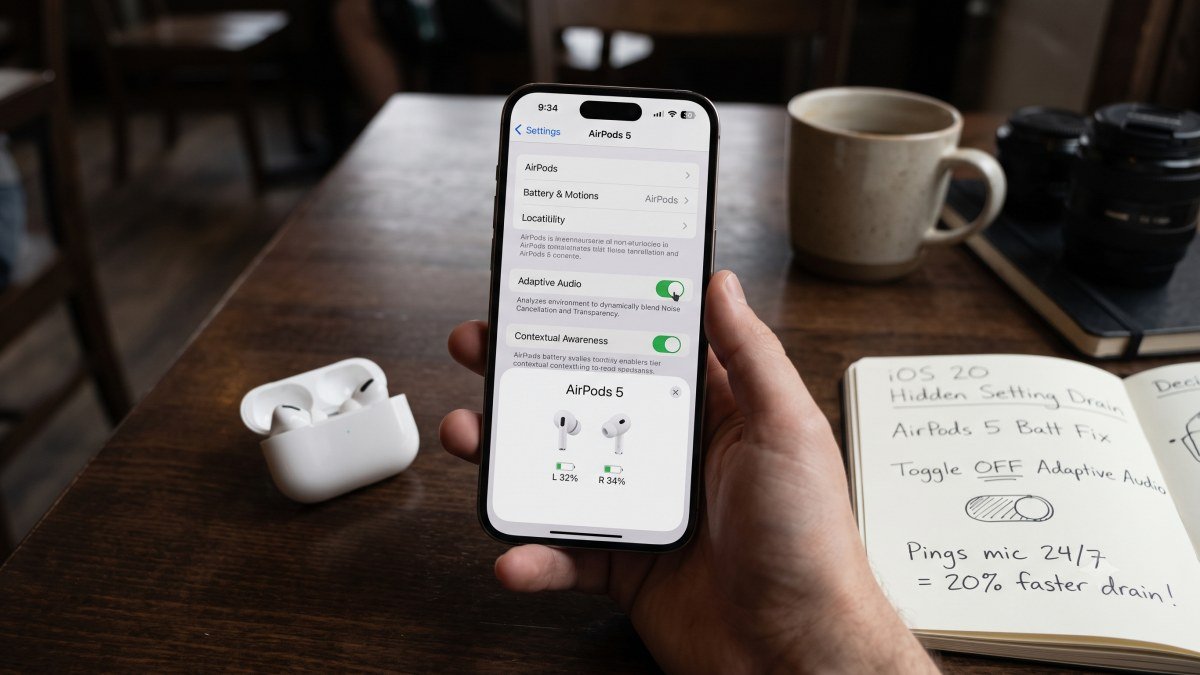
In theory, these features are brilliant. Adaptive Audio dynamically blends Active Noise Cancellation (ANC) and Transparency Mode based on your environment. If you are walking down a quiet street, it lets ambient sound in. If a siren blares or a loud truck drives by, it instantly clamps down and activates full ANC.
However, the execution is a nightmare for your battery. To achieve this real-time dynamic switching, iOS 20 forces the microphones on your AirPods 5 to remain on high alert, constantly "pinging" your environment to analyze background noise. Furthermore, Contextual Awareness uses conversational detection to automatically lower your media volume the second you start speaking.
This means the onboard H2 chip in your earbuds is working overtime, continuously processing audio data and running localized machine learning algorithms every single second they are in your ears.
The 20% Battery Penalty
How much damage does this actually do?
Standard AirPods 5 are rated for up to four hours of playback with standard ANC turned on, while the AirPods 5 with wireless charging case can squeeze out a little over five hours.
When iOS 20's Adaptive Audio and Contextual Awareness are left running, users are reporting a massive 20% reduction in battery life. This means you are losing nearly a full hour of listening time. For frequent travelers or office workers who rely on continuous background music to focus, losing an hour of endurance is unacceptable just to avoid manually turning down the volume when a coworker walks by.
Step-by-Step Guide: How to Turn Off Adaptive Audio
By default, iOS 20 hides these aggressive audio features behind a few menus. If you want your battery life back, you need to manually intervene and lock your AirPods into a static noise-control mode. Here is exactly how to do it.
Step 1: Open Your AirPods Settings
- Put your AirPods 5 in your ears and ensure they are connected to your iPhone.
- Open the Settings app on your iPhone.
- Tap on your AirPods 5 name (located near the top of the Settings menu, right under your Apple ID).
Step 2: Disable Conversational Awareness
- Scroll down to the Audio section.
- Locate the toggle for Conversation Awareness.
- Toggle the switch to the OFF (gray) position. This stops the microphones from constantly listening for your voice.
Step 3: Lock Your Noise Control
- Scroll back up to the Noise Control section.
- You will see four options: Noise Cancellation, Transparency, Off, and Adaptive.
- If Adaptive is highlighted in blue, it is actively draining your battery.
- Tap Noise Cancellation or Transparency to lock your earbuds into a static mode.
Pro Tip: You can easily switch between standard ANC and Transparency on the fly by long-pressing the stem of your AirPods 5, meaning you don't need the battery-draining "Adaptive" software to do it for you.
Reclaiming Your Audio Experience
Smartphone and accessory manufacturers are obsessed with making our devices "smarter" through constant background AI processing. While features like Adaptive Audio look great on an Apple keynote presentation, they often overlook the harsh reality of lithium-ion battery constraints.
By taking five minutes to adjust your iOS 20 settings, you immediately reclaim that lost 20% battery life, ensuring your AirPods 5 survive your entire commute, workout, or workday.
If you are frustrated with your current battery life and want to explore the latest smartphone upgrades that offer true all-day endurance, check out the best phone deals in the USA on DevDuniya, and stay tuned to the DevDuniya tech blogs for more hidden tips and tricks to optimize your Apple ecosystem.